

Project
Contact Form
Fill out the form and kick off the request flow end to end — client-side validation, a POST to API Gateway, and a Lambda function doing the work. Submit it and you'll land on a confirmation page; moments later, SES will send a confirmation email to your inbox.
Demo
Smoke Test
This form runs entirely in the browser and submits to AWS API Gateway
with fetch(). No server code is needed in the static site.
Privacy notice: your email address is used only to test and validate this AWS architecture. No addresses are collected, stored, or used for marketing or any other purpose beyond this one-time test.
Architecture
How It Works
This form is a real AWS project, not a mockup. Here's what actually happens between loading this page and an email landing in your inbox — click any step to jump to it, or let it play through on its own.





-
1
Route 53 resolves the domain
A user navigates to the contact form URL, triggering a DNS lookup. Route 53 resolves the domain name, returning the CloudFront distribution via an A record alias.
-
2
CloudFront serves the static assets
S3 returns the static assets (HTML, CSS, JavaScript) to CloudFront, which caches them at the edge and serves them to the browser.
-
3
S3 stores the site's files
The S3 bucket is the origin behind CloudFront — it holds the actual HTML, CSS, and JavaScript files that make up the page.
- The bucket has all public access blocked — only CloudFront's OAC is permitted to read from it.
- The browser parses and renders the HTML contact form using the JavaScript and CSS delivered from CloudFront. The JavaScript is responsible for intercepting the form submission and converting it into a JSON payload for the API call.
- Preflight — before submitting the form, the browser automatically sends an HTTP OPTIONS request to API Gateway to confirm cross-origin requests are permitted. API Gateway responds with the appropriate CORS headers, and the browser proceeds with the actual POST request.
-
4
API Gateway routes the request
API Gateway receives the POST request and matches the defined HTTP API route configuration. It then proxies the request to Lambda.
-
5
Lambda validates the submission
Lambda parses the JSON request body and validates that all fields are present, correctly formatted, and within character limits.
- Any invalid input returns a 400 response immediately, without engaging SES.
- Lambda sanitizes inputs by stripping HTML-unsafe characters to prevent injection attacks.
- AWS verifies that the function's IAM execution role includes the
ses:SendEmailpermission.
-
6
SES sends the emails
SES delivers two emails simultaneously: a notification to the admin, and a confirmation back to the visitor.
Use Cases
Where This Pattern Fits
This serverless contact-form pattern isn't specific to this site — the same S3 + API Gateway + Lambda + SES combination covers a few common needs without standing up a traditional backend.
Static site contact forms
Any static site — built with a site generator, a plain HTML page, or a single-page app — that needs a working contact form without a backend server to maintain.
Lightweight lead capture
Landing pages that need to capture signups or interest before a full CRM integration is worth the setup cost.
Feedback & support intake
Early-stage products that need a simple way to collect feedback or support requests before a full helpdesk platform makes sense.
Pricing
What This Actually Costs
Every piece of this architecture is pay-per-use — there's no server sitting idle, so cost scales with traffic. These are estimates based on public AWS list pricing, not a guarantee; actual cost depends on your usage and configuration.
What drives the cost
- Lambda — billed per request and per millisecond of compute time; this function runs in well under 100ms.
- API Gateway — billed per million requests, using the cheaper HTTP API type rather than REST API.
- SES — billed per 1,000 emails sent; two go out per submission, an admin notice and a visitor confirmation.
- S3 — a few cents a month at most; static hosting for a small site is close to free.
Design Decisions
Why I Built It This Way
A few choices here aren't the only way to build this — here's the reasoning behind them.
A one-field "smoke test" instead of a full contact form
Stripped down to just an email address on purpose — a demo visitor would just be typing placeholder text into name, subject, and message fields anyway. The point of this project is proving the architecture actually works end to end, not collecting real inquiries.
Two separate emails instead of one
A single email to me with the visitor's address set as reply-to would only prove half the point — a visitor should see their own confirmation too, not just trust that something happened on my end. SES sends two: a notification to me, and a separate confirmation back to whoever submitted the form.
Server-side validation, even though the browser already validates
The form checks required fields and email format before it ever submits. The Lambda checks all of it again anyway, because none of that client-side JavaScript is enforced — anyone can POST directly to the API and skip the browser entirely. The real validation is the one nothing can bypass.
A honeypot field instead of a CAPTCHA
One extra input, hidden from real visitors with CSS and never announced to screen readers, sits in the form. Bots that fill in every field trip it; the Lambda silently accepts the submission without sending mail. No third-party CAPTCHA service, no added friction for anyone actually testing the form.
CORS enforced at two layers, not one
Both API Gateway's own CORS configuration and the Lambda's own response headers check the request's origin — belt and suspenders. A misconfigured function handler, a missing environment variable, or a failing preflight check can each independently break a browser request; checking origin at both layers means one misconfiguration doesn't silently open the API to any site that asks.
Architecture Diagram
Full Architecture Diagram
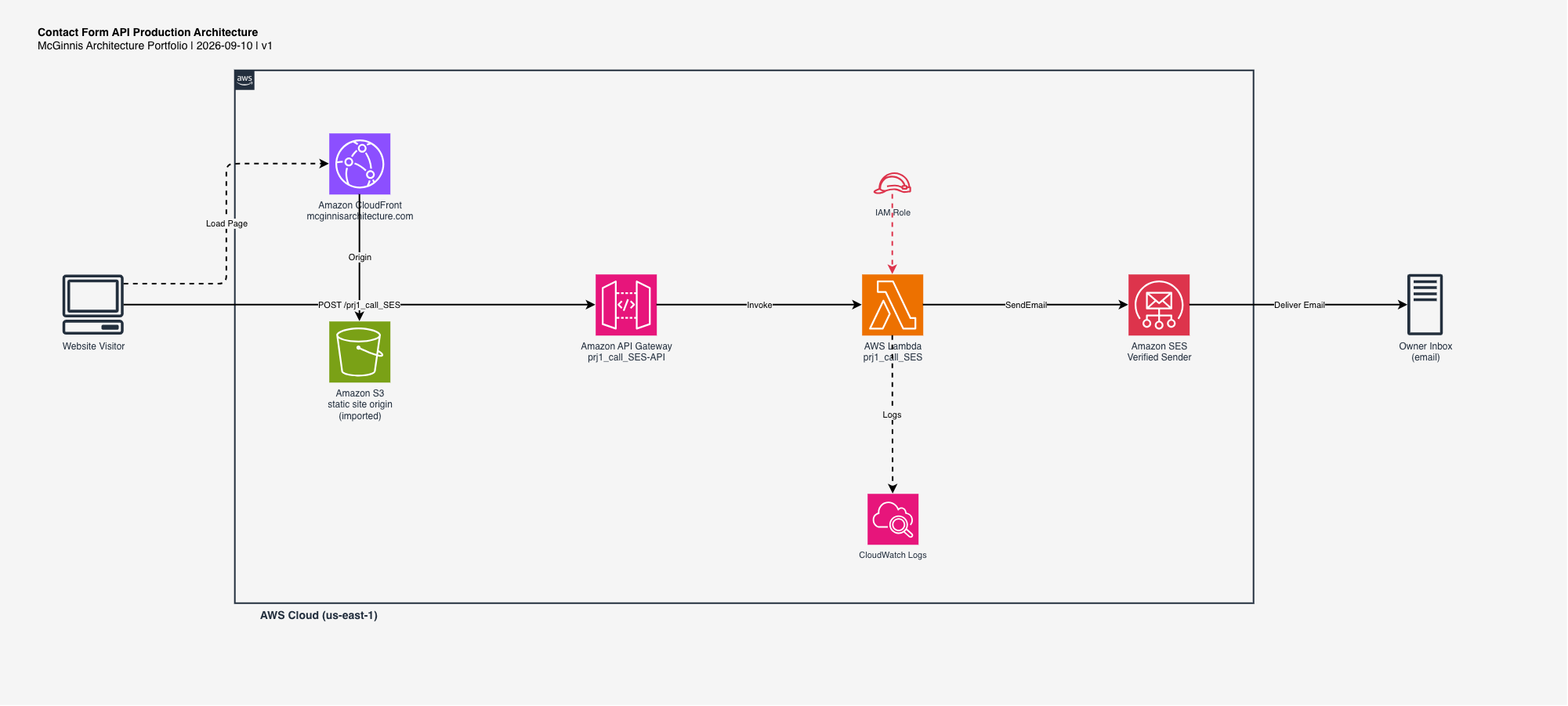
The complete AWS architecture diagram for this project, built with draw.io. Click it to expand full screen.