

Project
Moderated Image Gallery
Create an account, upload an image, and watch it move through Amazon Rekognition's automated content moderation before it either lands in the public gallery below or gets rejected and permanently deleted — no human reviewer, no queue.
Before You Upload
Community Guidelines
Every image is scanned automatically by Amazon Rekognition's content moderation API the moment it's uploaded. There is no manual review and no appeal — if Rekognition detects any of the categories below, the image is deleted immediately and marked rejected. No image is ever shown to a moderator, and no specific reason beyond "rejected" is stored or shown back to you.
This is Rekognition's full default moderation taxonomy applied at its default confidence threshold — a deliberately strict, zero-tolerance policy for a public demo, not a production moderation tuning recommendation. Only JPEG, PNG, or WebP images up to 5MB are accepted regardless of content.
Want to see exactly what's restricted? Expand to review the full list.
Nudity & sexual content
Explicit nudity, sexual activity, and non-explicit content like swimwear/underwear or intimate kissing are all flagged.
Violence & disturbing imagery
Graphic violence, weapons in a threatening context, self-harm, and visually disturbing content (blood, corpses, etc.) are all flagged.
Drugs, alcohol & tobacco
Illegal drug use and paraphernalia, plus any depiction of alcoholic beverages or tobacco products, are flagged — even in a casual context.
Hate symbols & rude gestures
Hate group symbols and offensive gestures are flagged, along with gambling imagery (cards, chips, slot machines).
Demo
Try It Yourself
Create an account (or sign in) to upload an image. Everything below runs against real AWS infrastructure — no mock data.
Privacy notice: only an email address and password are collected, used solely for Cognito authentication.
Signed in as
My uploads
No uploads yet.| File | Status | Download |
|---|
Public Gallery
Approved Uploads
Anyone can view this gallery — it only shows images that already passed moderation. Click an image to expand it. New uploads show up here as soon as they clear Rekognition's check; tap Refresh to pull the latest without reloading the page.
No approved images yet — be the first to upload one above.
Architecture
How It Works
This is a real AWS project, not a mockup. Here's what actually happens between clicking Upload above and an image landing in the gallery — click any step to jump to it, or let it play through on its own.





-
1
Visitor signs in via Cognito
The browser talks directly to a Cognito user pool's public API to sign up, confirm, log in, or reset a password — no server in the middle, and the resulting tokens live only in the browser's local storage.
-
2
Browser requests an upload slot
With a valid Cognito id token attached, the browser calls
POST /uploads. API Gateway's JWT authorizer verifies the token against the user pool before Lambda ever runs. -
3
Lambda creates a pending record and a presigned upload URL
A new DynamoDB item is written with status
PENDING, then a presigned S3 POST (not PUT) is generated — its policy conditions let S3 itself enforce the 5MB size limit and JPEG/PNG/WebP content-type restriction, not just a client-side check. -
4
Browser uploads directly to a private S3 quarantine bucket
The image bytes go straight from the browser to S3 using that presigned POST — Lambda never sees or touches the file itself, only its metadata.
-
5
A Lambda function runs Rekognition content moderation
The quarantine bucket's
ObjectCreatedevent triggers a Lambda that calls Rekognition'sDetectModerationLabelsAPI against the new object. -
6
Approved images move to the gallery, rejected ones are deleted
Clean images are copied to the public gallery bucket and the DynamoDB record flips to
APPROVED. Flagged images are deleted from quarantine immediately and the record flips toREJECTED— nothing that fails moderation is ever retained. Meanwhile the browser pollsGET /uploads/{id}every couple seconds to show the live result.
Use Cases
Where This Pattern Fits
Automated content moderation shows up anywhere user-generated images reach other people without a human in the loop first.
Marketplace & listing photos
Any marketplace that lets sellers upload their own product photos needs this exact check before a listing photo goes live to buyers.
Community & social platforms
Forums, comment sections, and social apps use the same pattern to auto-screen avatars and post attachments before they're visible to other users.
Employee & user-submitted content portals
Internal tools that accept photo uploads — expense receipts, asset photos, support tickets — benefit from the same automatic screening before storage.
Pricing
What This Actually Costs
Pay-per-use the whole way through — an unused demo costs nothing. These are estimates based on public AWS list pricing, not a guarantee.
What drives the cost
- Rekognition — one
DetectModerationLabelscall per upload, billed per image after a 5,000-image/month free tier for the first year. - Cognito — free for up to 50,000 monthly active users; this demo will never come close.
- S3 — negligible storage cost for approved images; quarantine objects never persist past a single moderation check.
- Lambda, DynamoDB, API Gateway — all billed per request/read/write; effectively free at this scale.
Design Decisions
Why I Built It This Way
A few choices here aren't the only way to build this — here's the reasoning behind them.
Custom sign-up/login forms, not Cognito Hosted UI
Hosted UI is the faster path, but it redirects the visitor
off this page entirely to a Cognito-hosted domain. Calling
Cognito's public API directly with fetch() keeps
the whole experience — including this project's own
look and feel — on one page, with no OAuth redirect round trip.
Presigned POST, not a presigned PUT
A presigned PUT URL only controls who can upload — any size or content-type limit would exist purely as an unenforced client-side suggestion. A presigned POST's policy conditions let S3 itself reject an oversized or wrong-type file server-side, before it's even fully received.
Binary approved/rejected status only
Rekognition returns specific moderation categories (nudity, violence, etc.), but this project deliberately never stores or surfaces which one triggered a rejection — only that it was rejected. That keeps the guidelines section above the one and only place the rules are documented, instead of the API response becoming a second, conflicting source of truth.
A separate quarantine bucket, deleted on rejection
Rejected uploads are deleted outright rather than kept around "for review" — there's no moderator in this system to review them, so retaining flagged content would only be a liability with no benefit. Quarantine and gallery are two separate buckets specifically so a rejected image is never briefly reachable from the same bucket approved images live in.
A sparse GSI instead of read-time filtering
galleryPk is only ever set on an item once it's
approved, so the gallery's GSI naturally contains exactly the
public gallery's contents — no read-time filtering needed to
keep pending or rejected uploads out.
Architecture Diagram
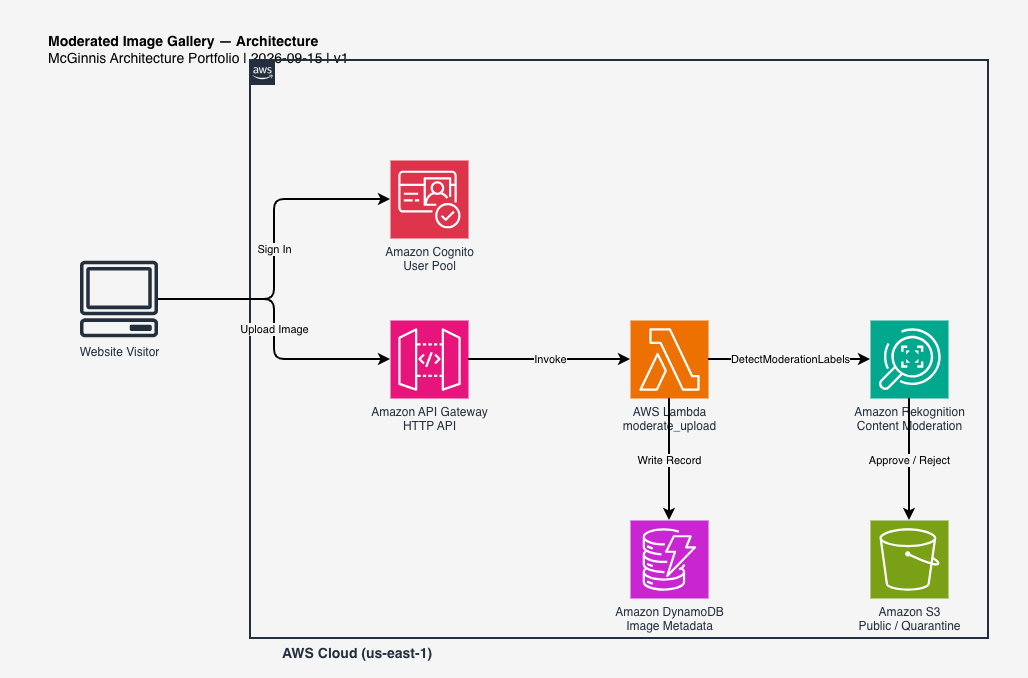
Full Architecture Diagram
The complete AWS architecture diagram for this project, built with draw.io. Click it to expand full screen.