

Project
VPC Network Design
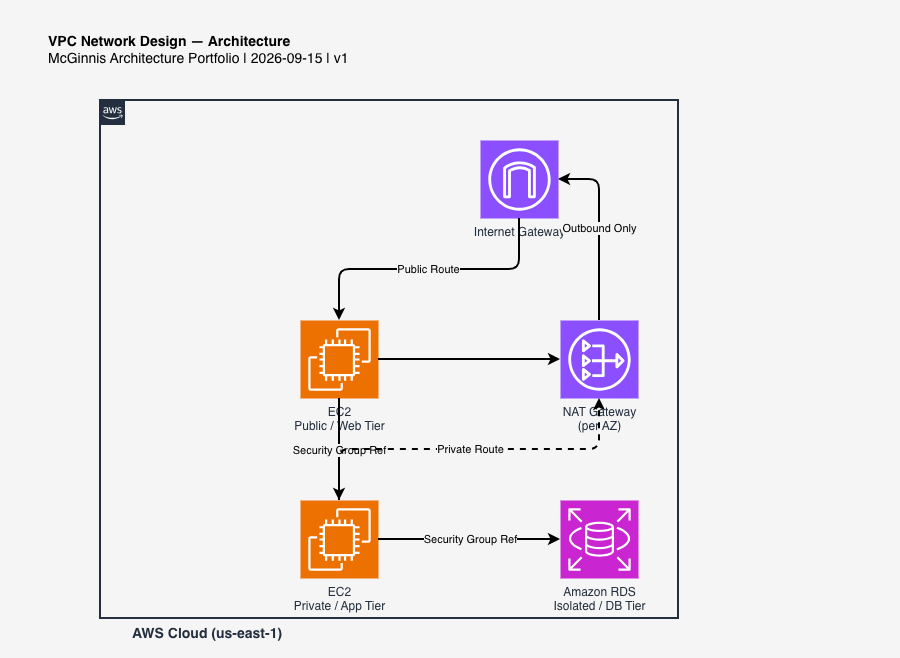
A multi-tier VPC spanning two Availability Zones — public, private, and isolated subnets, a NAT Gateway per AZ, and security groups scoped tier-to-tier. Nothing here is live traffic; every route table and security group rule below is the actual design this CDK stack would provision.
Demo
Click to Inspect the Network
This diagram is the real topology this project's CDK stack would provision. Click any subnet or resource icon to see its route table or security group rules on the right. Nothing here calls a live AWS API — every rule shown is static, baked into this page.
Click any subnet or resource in the diagram to inspect it.
Architecture
How It Works
A reference architecture, not a mockup — this is exactly what this project's CDK stack provisions if it were ever instantiated. It never is: see Design Decisions for why. Click any icon to jump to that step, or let it play through on its own.


-
1
One VPC, three subnet tiers, two Availability Zones
A single
ec2.Vpcwith an explicitsubnetConfiguration:PUBLIC,PRIVATE_WITH_EGRESS, andPRIVATE_ISOLATEDsubnet groups, each duplicated acrossus-east-1aandus-east-1bfor availability. -
2
Public subnets route outbound through the Internet Gateway
Each public subnet's route table sends
0.0.0.0/0traffic straight to the VPC's Internet Gateway — this is the only tier CDK attaches a public IP to by default. -
3
Private subnets route outbound through a per-AZ NAT Gateway
CDK provisions one NAT Gateway per AZ by default (not one shared gateway), so a private subnet's outbound traffic never crosses an AZ boundary just to reach the internet — the tradeoff is paying for two NAT Gateways instead of one.
-
4
Isolated subnets have no route out at all
The database tier's route table has only the local
10.0.0.0/16route — no NAT Gateway, no Internet Gateway. It can only be reached from inside the VPC, and it can't reach anything outside it either. -
5
Security groups enforce tier-to-tier access, not subnet boundaries
Subnets and route tables control where traffic can go; security groups control what's actually allowed once it's there. The app tier's security group only accepts inbound traffic from the web tier's security group, and the database tier's only accepts inbound from the app tier's — not from an IP range, from another security group by reference.
Use Cases
Where This Pattern Fits
Any workload that needs to separate what's internet-facing from what should never be, without relying on IAM alone to enforce it.
Three-tier web applications
Load balancer and web tier in public subnets, application servers in private subnets, database in isolated subnets — the classic shape this diagram demonstrates directly.
Regulated workloads
Payment or health-data processing that must prove a database has no route to the public internet — an isolated subnet with no NAT and no IGW route is that proof at the network layer, not just a policy document.
Multi-AZ high availability
Duplicating every subnet tier across two AZs, each with its own NAT Gateway, means losing one AZ doesn't take outbound connectivity down with it in the surviving AZ.
Pricing
What Deploying This Would Cost
Estimates based on public AWS list pricing for us-east-1,
not a guarantee — and not a bill this project has ever
actually incurred, since it's never been deployed.
What drives the cost
- NAT Gateway — the dominant cost: ~$0.045/hour per gateway (~$32.85/month) plus ~$0.045/GB processed, and this design uses two (one per AZ) for availability — roughly $65–90/month before any data processing charges, even completely idle.
- Elastic IP addresses — one per NAT Gateway; free while attached and in use, a small hourly charge if ever left unattached.
- VPC itself, subnets, route tables, security groups, and the Internet Gateway — no charge; you only pay for the resources placed inside them and the NAT Gateways' data processing.
- VPC Flow Logs (not enabled in this stack, but a common addition) — CloudWatch Logs ingestion/storage charges if turned on.
Total: roughly $35–90/month for the networking layer alone, before adding a single EC2 instance, load balancer, or database — which is why this reference stays undeployed rather than running idle indefinitely.
Design Decisions
Why I Built It This Way
A few choices here aren't the only way to build this — here's the reasoning behind them.
Reference-only, deliberately never deployed
A NAT Gateway bills by the hour whether or not any traffic
crosses it, so a portfolio demo that's mostly idle between
visits would spend the majority of its runtime paying for
infrastructure nobody is looking at. The
CDK stack behind this design is real,
compilable code — it's simply never added to the
deployed app, so cdk deploy
can't touch it even by accident. This page's diagram and route
tables are the actual design, not a simplified stand-in for it.
Click-to-inspect, not autoplay
Other reference-only projects in this portfolio animate a sequence over time, because the thing they're demonstrating is a sequence (a failover, a rolling deployment). A VPC's value is its static topology — which subnet can reach what, and through which route — so this page has no timers at all. You inspect it the same way you'd inspect a real VPC in the AWS console: by clicking on things.
One NAT Gateway per AZ, not one shared gateway
CDK's default subnetConfiguration behavior
provisions a NAT Gateway per AZ automatically, which roughly
doubles the NAT cost shown in the pricing section above
compared to a single shared gateway. It's kept here because
it's the higher-availability, more production-realistic
default — a single shared NAT Gateway is a valid cost
optimization for a lower-availability workload, but this
reference is meant to show the pattern most SAA-level designs
actually recommend.
Security groups referenced by group, not by CIDR
The app and database tiers' inbound rules reference the calling tier's security group id rather than a subnet's CIDR block. A CIDR-based rule stays correct even if a resource moves to a different subnet within the same tier; a group-reference rule stays correct even if the tier's subnet layout changes entirely, which is the more common source of drift in practice.
Next Iteration
What I'd Change Next
The gaps I know about: what I'd add before trusting this with real traffic or real data.
VPC endpoints before NAT
S3 and DynamoDB gateway endpoints are free and keep that traffic off the NAT gateways, which are the expensive part of this design. I'd add them first.
Flow logs
The design has no VPC Flow Logs. I'd send them to S3 so a rejected connection can be traced after the fact.
Architecture Diagram
Full Architecture Diagram
The complete AWS architecture diagram for this project, built with draw.io. Click it to expand full screen.