

Project
Order Processing
Place a demo order and watch it move through a real Step Functions pipeline — reserve inventory, charge payment, ship. Opt in to a simulated payment failure and watch the state machine undo the inventory reservation it already made, instead of just reporting an error.
Demo
Place a Demo Order
This runs against a real AWS backend — no mock data. Stock is intentionally low per product, so ordering more than what's left is a real (not staged) way to see the other failure path.
Privacy notice: nothing personal is collected — each order is just a random id, a product, and a quantity.
Your order
- Submitted
- Inventory reserved
- Payment charged
- Shipped
My orders
No orders placed yet this session.| Product | Qty | Total | Status |
|---|
Architecture
How It Works
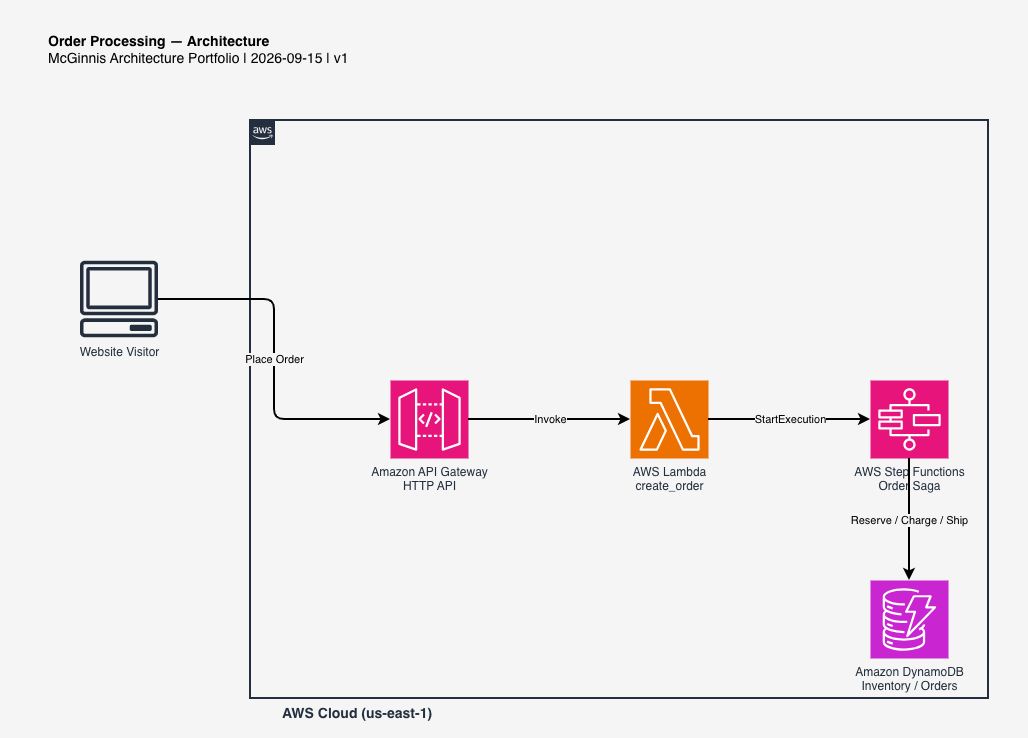
This is a real AWS project, not a mockup. Here's what actually happens between clicking Place order above and the timeline reaching Shipped — or, if payment fails, reaching a compensated Failed state instead. Click any step to jump to it, or let it play through on its own.




-
1
Visitor places an order
The chosen product, quantity, and device id go to
POST /orders, along with whether you checked "simulate a payment failure." -
2
Lambda creates the order and starts the state machine
A new DynamoDB item is written with status
PENDING, then Lambda calls Step Functions'StartExecutionand immediately returns the order id — it doesn't wait for the pipeline to finish. -
3
Step Functions attempts to reserve inventory
A task Lambda tries an atomic conditional decrement against the product's stock. If there isn't enough left, the order is marked
FAILEDright there — no compensation needed, since nothing was ever reserved. -
4
DynamoDB atomically reserves stock and charges payment
With inventory reserved, a second task Lambda "charges" a simulated payment. If you checked the simulate-failure box, this step reports a decline instead of succeeding.
-
5
Order ships, or a failed payment triggers compensation
A successful charge moves straight to
SHIPPED. A declined charge instead runs a third task Lambda that adds the reserved quantity back to stock — undoing step 3 — before the order is markedFAILED. That release step is the actual Saga-style compensating transaction this project exists to demonstrate.
Use Cases
Where This Pattern Fits
Any multi-step transaction where a later step can fail after an earlier step already changed something needs this same compensating-action shape.
E-commerce checkout
The textbook case — reserve stock, charge a card, ship. A declined card after inventory is held has to release that hold, or stock silently leaks away.
Travel & multi-vendor bookings
Booking a flight and a hotel as one transaction — if the hotel booking fails after the flight is confirmed, the flight reservation needs to be cancelled, not left stranded.
Distributed financial transfers
Debiting one account and crediting another as separate steps — if the credit fails, the debit has to be reversed rather than money simply disappearing.
Pricing
What This Actually Costs
Pay-per-use the whole way through — an unclicked demo costs nothing. These are estimates based on public AWS list pricing, not a guarantee.
What drives the cost
- Step Functions — billed per state transition; a shipped order uses 4 (reserve, charge, ship, plus the initial entry), a compensated one uses 5 (adding the release step), after a 4,000/month free tier.
- Lambda — up to four small functions on the order path (create, reserve, charge, release), billed per request and per millisecond.
- DynamoDB — on-demand billing for the orders table and its owner index, plus the tiny inventory table; no idle capacity to pay for.
- API Gateway — billed per request across the create/read/list/catalog routes.
Design Decisions
Why I Built It This Way
A few choices here aren't the only way to build this — here's the reasoning behind them.
Failures return a result, they don't raise
reserve_inventory_handler.py and
charge_payment_handler.py both return an
ordinary {"success": false, "reason": ...}
payload instead of throwing, and the state machine branches
on that with a Choice state. Out-of-stock and a declined
card are expected business outcomes here, not exceptions --
reserving Step Functions' error-handling machinery (Catch,
Retry) for genuine infrastructure failures keeps the two
concerns separate.
An explicit "simulate failure" checkbox, not random chance
A randomly-failing demo is frustrating to actually demo -- you'd have to keep retrying to show the interesting path. Making the failure deliberate and visitor-controlled means the compensating-transaction behavior is reliably reachable, while running out of real stock (by ordering more than what's left) still demonstrates a genuinely data-driven failure alongside it.
A generic timeline component, not a one-off widget
The step-by-step timeline UI is a generic
.job-timeline component with one "failed" visual
state added on top — built to render whatever stage list and
status it's handed, rather than being hardcoded to this
order flow specifically.
A tiny fixed catalog, lazily seeded
Product names and prices live in code (catalog.py),
not a database — there's no admin UI for this demo, so a
resizable catalog table would be unused complexity. Stock
counts are the one thing that's genuinely mutable, and even
that's seeded lazily via DynamoDB's if_not_exists()
the first time a product is ever ordered, rather than
needing a separate seed step at deploy time.
Architecture Diagram
Full Architecture Diagram
The complete AWS architecture diagram for this project, built with draw.io. Click it to expand full screen.