

Project
Container Orchestration
Watch a rolling deployment roll a new version out across a Fargate service one task at a time — the same health-check-then-drain sequence ECS's native deployment controller runs behind an Application Load Balancer, simulated here instead of triggered against a live cluster.
Demo
Simulate a Rolling Deployment
This interaction is entirely simulated in your browser — no AWS account, no real ECS cluster. Clicking "Deploy new version" plays out the same task-by-task rollout an actual Fargate service would run.
Architecture
How It Works
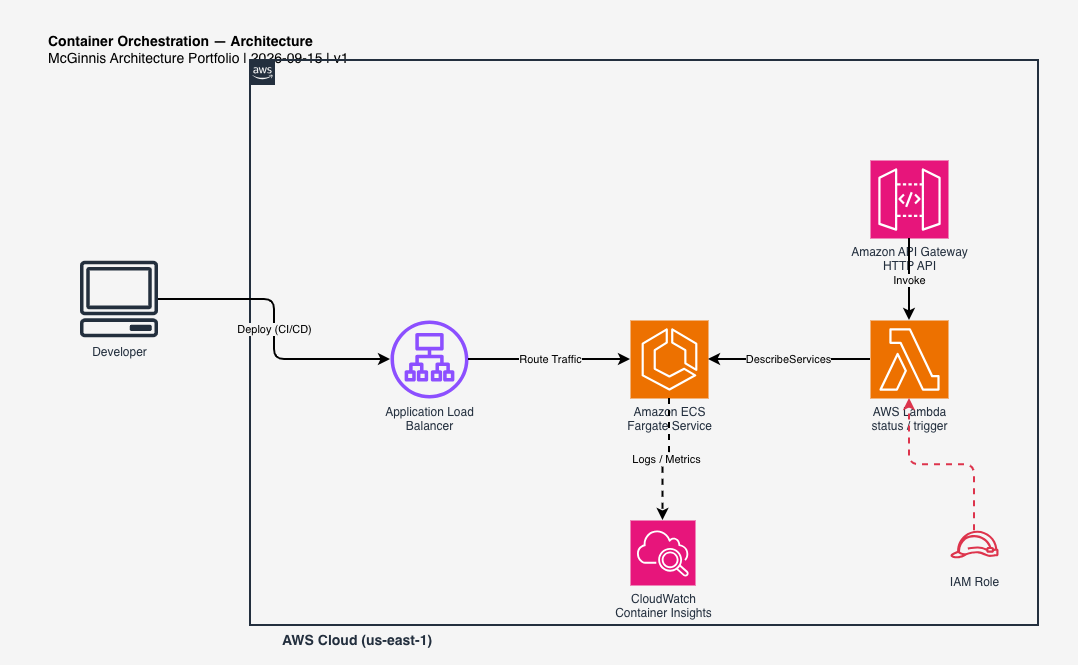
This is what the deployment above stands in for — the actual sequence a CI/CD pipeline and ECS's rolling-update controller would run against a real Fargate service. Click any icon to jump to that step, or let it play through on its own.


-
1
A new image is pushed and a deployment is triggered
A CI/CD pipeline builds a new container image, pushes it to a registry, and calls
ecs:UpdateServicewithforceNewDeployment— the same call this page's "Deploy new version" button simulates. -
2
ECS starts new tasks alongside the old ones
With
minHealthyPercent: 100andmaxHealthyPercent: 200, the service can temporarily run up to twice its desired count, so capacity never drops while the rollout is in progress. -
3
The load balancer health-checks each new task
Only once a new task passes its ALB target group health check does it start receiving real traffic — an unhealthy new task never gets promoted, and enough failures trip the deployment circuit breaker.
-
4
An old task drains and stops
Once its replacement is healthy, ECS deregisters an old task from the target group, lets in-flight requests finish, then stops it — one task at a time, never all at once.
-
5
The cycle repeats until every task is on the new version
Steps 2-4 repeat task by task until the whole service is running the new task definition — if too many new tasks fail health checks along the way, the circuit breaker automatically rolls the service back to the previous task definition instead.
Use Cases
Where This Pattern Fits
Any containerized service that needs zero-downtime releases behind a load balancer fits this shape.
API backends
A stateless HTTP API behind an ALB is the textbook Fargate workload — scale the task count, roll deployments, never touch an EC2 instance directly.
Internal microservices
Multiple small services on one cluster, each with its own service/target group, sharing the cluster's compute without sharing a deployment lifecycle.
Lift-and-shift from EC2
Existing Docker-packaged applications that need managed scaling and rolling deploys without a full rewrite to serverless.
Pricing
What This Would Cost If Deployed
Unlike this portfolio's pay-per-request projects, this architecture has a flat monthly floor regardless of traffic — that floor, not usage, is why it isn't deployed. Estimates based on public AWS list pricing for us-east-1, not a guarantee.
What drives the cost
- NAT Gateway — ~$0.045/hour flat (~$33/month) plus data processing, regardless of whether any task ever handles a request.
- Application Load Balancer — ~$0.0225/hour flat (~$16/month) plus per-LCU usage charges.
- Fargate tasks — billed per vCPU-second and GB-second while running; six small tasks (0.25 vCPU / 0.5 GB each) at 100% uptime run roughly $25-40/month on their own.
- ECS control plane, CloudWatch Logs, status API — comparatively negligible; Lambda and API Gateway here stay well inside their free tiers.
Total: roughly $75-200/month depending on task count and Fargate sizing — before any real traffic at all.
Design Decisions
Why I Built It This Way
A few choices here aren't the only way to build this — here's the reasoning behind them.
Rolling update, not blue/green
ECS's native rolling-update deployment controller
(minHealthyPercent/maxHealthyPercent
plus a deployment circuit breaker) needs only the service
itself — no second target group, no extra listener, no
CodeDeploy application. A CodeDeploy
EcsDeploymentGroup blue/green setup could sit on
top of this same service later; it's left out here because
it would add real infrastructure without changing what the
demo above actually shows.
A public sample image, not a custom one
The task definition points at a public nginx image rather than a purpose-built application image — there's no real running service behind this stack, so building and pushing a bespoke image would be effort spent on something nobody ever deploys.
The status API is real, the deployment demo isn't
deployment_status_handler.py and
trigger_deployment_handler.py are written as
genuine ECS API callers, matching this portfolio's other
Lambda handlers — but this page never calls them. The
#demo section above is a pure client-side
animation, kept deliberately separate from the backend code
so the reference architecture stays honest even though it's
never wired up to a live endpoint.
Next Iteration
What I'd Change Next
The gaps I know about: what I'd add before trusting this with real traffic or real data.
Blue/green for real traffic
Rolling updates with a circuit breaker are enough for a reference design. For a service with paying users I'd use CodeDeploy blue/green with a canary step, so a bad release never takes all traffic.
A real image in the pipeline
The task definition points at a public nginx image. A real build would produce its own image in CI and scan it in ECR before it could be deployed.
Architecture Diagram
Full Architecture Diagram
The complete AWS architecture diagram for this project, built with draw.io. Click it to expand full screen.