

Project
Multi-Region Disaster Recovery
Three ways to survive a region outage — pilot light, warm standby, and active-active — each trading idle-time cost against how fast traffic actually comes back. Pick a posture, then simulate an outage and watch Route 53's health-check failover carry traffic to the standby region.
Demo
Simulate a Region Outage
Everything below runs in your browser — there's no real Route 53 health check or DynamoDB Global Table behind it. Pick a posture, then trigger the outage to watch the simulated failover sequence.
us-east-1
Primary — serving traffic
us-west-2
Standby — pilot light
- Health check failing
- Route 53 failing over
- Standby promoted
- Serving from us-west-2
Architecture
How It Works
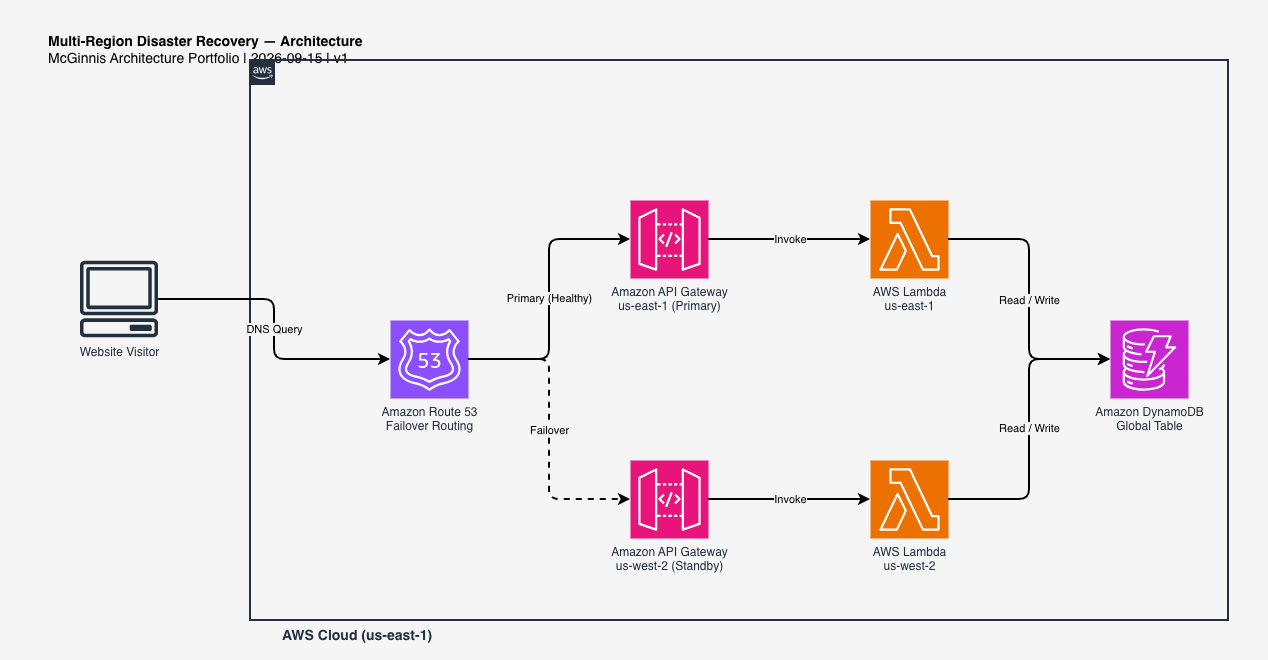
This is a reference architecture, not a mockup of one — the diagram below is exactly what this project's CDK stack would provision if it were ever wired into a deploy. Click any step to jump to it, or let it play through on its own.



-
1
DNS query reaches Route 53
Route 53's failover routing policy holds two record sets for the same name — one marked
PRIMARY, oneSECONDARY— and continuously evaluates a health check against the primary region's API endpoint before answering. -
2
Healthy path routes to the primary region
As long as the health check passes, Route 53 answers with the
PRIMARYrecord, and traffic reaches us-east-1's API Gateway exactly like any single-region project in this portfolio. -
3
Lambda serves the request
A Lambda function in the primary region reads or writes failover state through the DynamoDB Global Table — the same handler code would run in either region, since neither one is hardcoded as "the real one."
-
4
DynamoDB Global Table, primary copy
Every write lands in the primary region's table copy first.
-
5
Replication keeps the standby region current
DynamoDB Global Tables replicate every write to the standby region's table within roughly a second, typically — so when a failover happens, the standby region isn't starting from stale data. This is what makes pilot light viable at all: the expensive-to-warm-up part (compute) can stay cold, because the cheap-to-replicate part (data) never does.
Use Cases
Where Each Posture Fits
The right posture is almost always a business question — "what does an hour of downtime cost us?" — before it's a technical one.
Pilot light — internal tools, low-traffic services
A few minutes of downtime during a genuine region-wide AWS outage is tolerable, and the cost of a mostly-idle standby region needs to stay close to zero.
Warm standby — customer-facing production apps
An always-on (if smaller) second-region copy means failover is a traffic cutover, not a cold start — worth the steady extra spend once real customers are affected by downtime.
Active-active — revenue-critical, latency-sensitive systems
Both regions already serve real traffic, so "failover" is just routing more of it to the region that's still healthy — the only posture with effectively zero recovery time, at the highest steady-state cost.
Pricing
What Each Posture Actually Costs
Unlike this portfolio's live projects, DR cost isn't driven by traffic volume — it's driven by how much you keep running in the standby region while nothing is wrong. Estimates based on public AWS list pricing, not a guarantee.
What drives the cost
- Standby compute — the single biggest lever: cold (pilot light) vs. always-on-but-small (warm standby) vs. full-scale (active-active).
- DynamoDB Global Tables — replicated write costs in every region, present in all three postures since data has to be current regardless of posture.
- Route 53 health checks — a small, fixed per-health-check monthly fee, the same across all three postures.
- Cross-region data transfer — replication traffic between regions, scaling with write volume rather than posture.
Design Decisions
Why I Built It This Way
A few choices here aren't the only way to build this — here's the reasoning behind them.
Route 53 failover routing, not a third-party global load balancer
AWS Global Accelerator is the other common answer here, and trades DNS TTL-based propagation delay for faster, anycast-based failover at a higher fixed monthly cost. Route 53 health-check failover is the more common starting point precisely because it adds no fixed cost beyond the health check itself — the right trade for most workloads that don't need sub-second failover.
DynamoDB Global Tables over cross-region replication jobs
A scheduled or event-driven replication job is another way to keep a standby region's data current, but it introduces its own lag and failure modes to reason about. Global Tables make replication a property of the table itself — every region with a replica sees writes from every other region within about a second, with no separate pipeline to build or monitor.
Three fixed postures, not a continuous cost slider
Real DR decisions cluster around a small number of genuinely distinct architectures, not a smooth dial — a region is either running full-scale compute, a scaled-down copy, or none at all. Presenting three discrete postures matches how this decision actually gets made, rather than implying a granularity that doesn't reflect how the underlying infrastructure works.
Simulated, not deployed
A real second region costs money every hour it exists, regardless of whether an outage ever happens — that's the entire point of DR, and also why it doesn't belong running continuously behind a portfolio demo. See "Why this isn't deployed" in the README for the actual numbers.
Next Iteration
What I'd Change Next
The gaps I know about: what I'd add before trusting this with real traffic or real data.
Rehearse the failover
A DR design nobody has failed over to is still a hypothesis. I'd schedule regular game-day failovers and record the recovery time and data loss actually measured.
Put numbers on each posture
I'd set a target recovery time and an acceptable amount of data loss for each of the three postures, then check every rehearsal against them. That turns the posture choice into a measured trade-off instead of a cost comparison alone.
Architecture Diagram
Full Architecture Diagram
The complete AWS architecture diagram for this project, built with draw.io. Click it to expand full screen.