

Project
Habit Tracker
Add a habit, check in once a day, and watch your streak grow. Miss a day and a background EventBridge Scheduler job quietly resets it the next morning — no visitor request has to trigger that, it just happens on a schedule.
Demo
Track a Habit
This runs against a real AWS backend — no mock data. Add a habit below and check in once a day to build a streak; each card tracks a running streak and a personal best, calculated from real check-in timestamps in DynamoDB, not just a total check-in count.
Miss a day and the current streak resets to zero, but your best streak stays on the card — so you can always see how today's run compares to your best run so far.
No habits yet — add one above to get started.
Architecture
How It Works
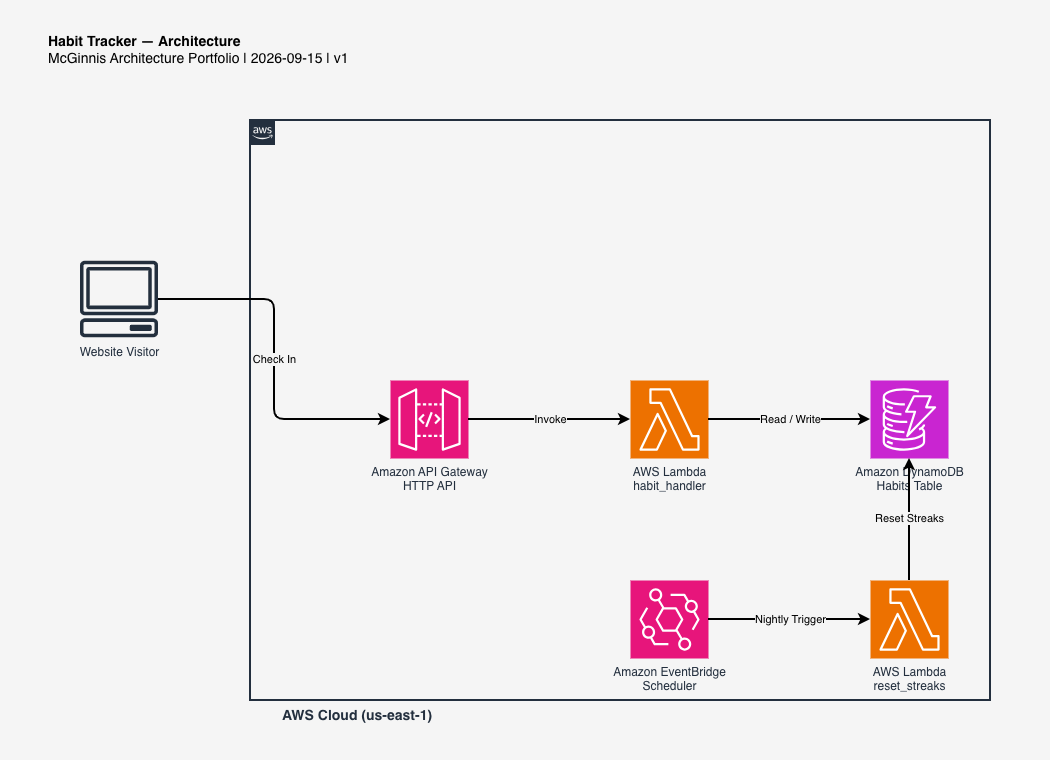
This is a real AWS project, not a mockup. Here's what actually happens both when you check in, and every night in the background whether you visit the site or not — click any step to jump to it, or let it play through on its own.




-
1
Visitor clicks Check in today
The browser sends its locally-generated device id along with the habit id to
POST /habits/{id}/checkins— there's no sign-in step first. -
2
Lambda updates the streak
Lambda compares today's date against the habit's last check-in date: yesterday means the streak continues, anything else means it restarts at 1.
-
3
DynamoDB stores the habit and its check-ins
One table holds each habit's current/longest streak; a second table holds one row per day checked in, which is what draws the calendar grid on each card.
-
4
EventBridge Scheduler runs once every night
A cron schedule fires shortly after midnight UTC, every single day, with nobody visiting the site required to trigger it.
-
5
A Lambda function resets any streak that missed yesterday
The scheduled job scans every habit in the table and zeroes
currentStreakfor any whose last check-in wasn't yesterday —longestStreakis never touched, so your best run stays on record.
Use Cases
Where This Pattern Fits
A scheduled background job that acts on data nobody is actively looking at shows up constantly in real systems.
Subscription & trial expiry
A nightly job that checks every account for an expired trial or a failed renewal, instead of checking on every single request.
SLA & streak-style metrics
Any "consecutive days/periods without an incident" counter needs the exact same daily "did this get satisfied yesterday?" check this project runs.
Scheduled reports & digests
Nightly or weekly summary emails, cleanup jobs, and cache-warming tasks all follow the same "run on a clock, not on a request" shape.
Pricing
What This Actually Costs
Pay-per-use the whole way through — an unused demo costs nothing. These are estimates based on public AWS list pricing, not a guarantee.
What drives the cost
- EventBridge Scheduler — one invocation per day, effectively free at any realistic scale for this project.
- DynamoDB — on-demand billing for two tables (habits, check-ins); the nightly reset job's table Scan is the only recurring read cost that grows with total habit count rather than traffic.
- Lambda & API Gateway — billed per request; effectively free at this scale.
Design Decisions
Why I Built It This Way
A few choices here aren't the only way to build this — here's the reasoning behind them.
Anonymous device id instead of an account
A habit tracker's core idea — check in, watch a streak, see a scheduled job act on it — doesn't need real Cognito authentication to demonstrate; a disclosed, no-account identity keeps the demo's friction at zero without pretending it's something it isn't.
EventBridge Scheduler, not an EventBridge Rule
A classic EventBridge Rule with a cron expression would work too, but Scheduler is the newer, purpose-built service for exactly this: a single schedule with a first-class target, without needing a whole event bus and rule pattern around it for what is genuinely just "run this Lambda once a day."
The reset job never touches longestStreak
A missed day should cost you your current streak, not erase
the record of your best one. Keeping that as a separate
field that only ever increases (in check_in_handler.py) means
the nightly job's UpdateExpression only ever
needs to write currentStreak.
A full table Scan in the reset job, on purpose
Every other "list" endpoint on this site avoids Scan because it can't answer "the most recent N" reliably. This job needs the opposite thing — every row, with no ordering requirement at all — which is exactly what Scan is for; reaching for a GSI here would add complexity to solve a problem this job doesn't have.
Architecture Diagram
Full Architecture Diagram
The complete AWS architecture diagram for this project, built with draw.io. Click it to expand full screen.